
MyMoney Pro - Expense & Budget
Ananta RahaFinance
4.7472.00 Reviews
- Version
- 6.1-pro
- Installs
- 10.00K
- Age Rating
- Everyone
Screenshots
Our Review of MyMoney Pro - Expense & Budget
 Analysis by Appyee
When a budget app starts to feel like another chore, I find it helps to focus on one small question: where did my money go this week? MyMoney Pro – Expense & Budget is built around tracking spending and planning savings, and it makes the most sense when I treat it as a practical record rather than a financial autopilot. That distinction matters: a useful budget depends on entries being accurate and habits being realistic, not just on having charts.
Getting Started with MyMoney Pro
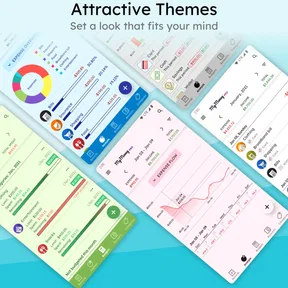
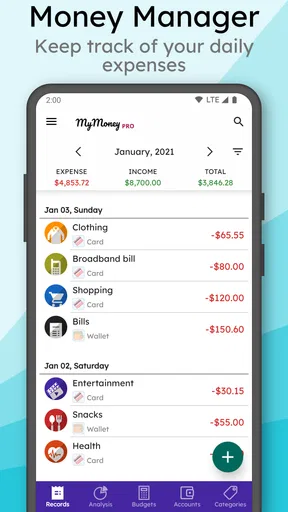
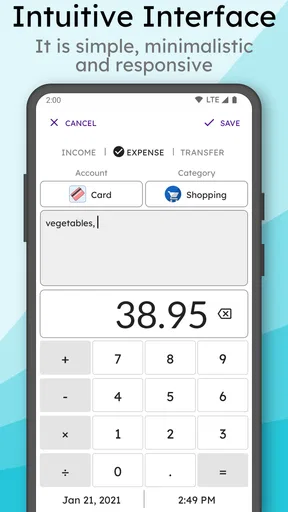
Kicking things off with MyMoney Pro – Expense & Budget is like having a personal finance guru right in your pocket. The setup process is straightforward, and before you know it, you're diving into the world of expense tracking. The user interface is clean and intuitive, which is a big win in my book. No one wants to sift through a cluttered app when you're just trying to get a grip on your finances.
Where a budget routine can get stuck
The biggest obstacle with any manual money manager is consistency. A coffee, a transit fare, and a quick grocery stop may each seem too minor to record, but leaving them out can make a category look healthier than it really is. I’d rather enter a purchase while it is fresh than try to reconstruct a week of small spending from memory. The app can organize the information I give it; it cannot reliably fill in a missing transaction for me.
That trade-off is worth considering before paying for a dedicated tool. MyMoney Pro is a paid finance app from Ananta Raha, priced at $4.99, and it is listed for Everyone. It has a 4.7 average from around 6,100 ratings, with over 10,000 installs. Those figures suggest that plenty of people find it useful, but they do not tell me whether its hands-on approach will suit someone who wants every transaction imported automatically. I’d choose it for deliberate tracking, not on the assumption that it will remove all routine work.
Setup checks that make the first week easier
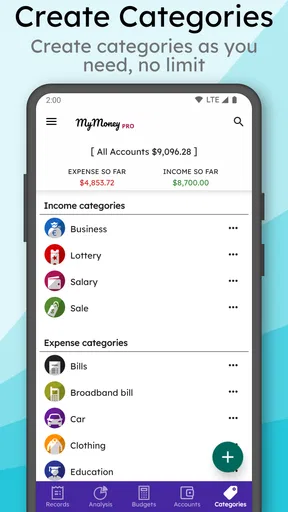
Before entering a month of transactions, I’d decide what I want the budget to answer. If the question is “How much do I spend on food away from home?”, I would keep that category distinct from groceries rather than sorting both into a broad catch-all. A few clear categories are more useful than a long list that takes too much thought every time I log a purchase. The best structure is the one I can apply consistently.
I’d also set a simple starting point: note the accounts or cash balances I intend to track, choose the currency I actually use, and set budgets only for categories I can recognize in day-to-day spending. Because the app supports multiple currencies and recurring transactions, those options can help with travel or regular bills, but they also need deliberate setup. A recurring entry should reflect the amount and timing I expect; if a bill changes, I would review it rather than assume an old figure still represents the current cost.
Features That Stand Out
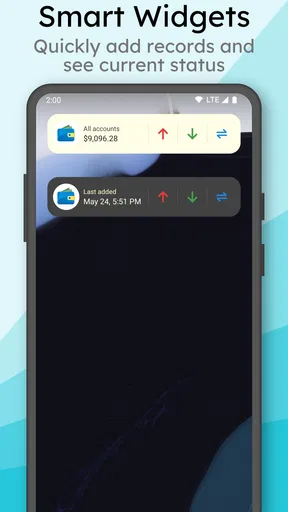
One of the coolest features of this app is its comprehensive expense tracking. You can easily log your daily expenses, organize them by category, and even set up recurring transactions. It's like having a financial assistant who never sleeps. The app also supports multiple currencies, which is a lifesaver if you’re a globetrotter or dealing with international transactions.
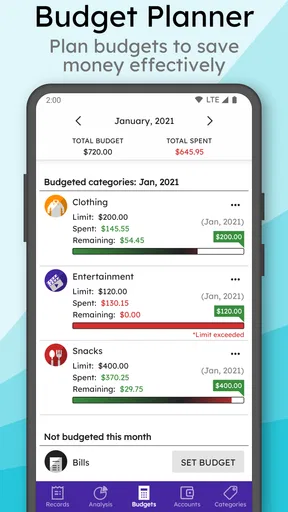
But wait, there's more! The budget planning feature is another gem. You can set monthly budgets for different categories and the app will help you make sure you don’t go overboard. It's like having your personal spending coach cheering you on to save more and spend wisely.
A realistic workflow for everyday spending
Picture a normal weekday: I buy lunch, pick up a few groceries on the way home, and pay a regular bill. I would record the first two as they happen, using categories I have already chosen, then check the recurring transaction against the bill rather than entering the same regular expense from scratch. Near the end of the week, I’d look at the category totals and ask whether a spike came from a one-off purchase or a pattern I should account for next month. That review turns a list of transactions into a decision I can act on.
A useful refinement is to avoid changing a budget every time I exceed it. First I’d check whether I forgot an entry, chose the wrong category, or had an unusual expense. If the numbers are accurate and the overspending repeats, then adjusting the plan may be sensible. This keeps the budget from becoming a record of wishful thinking while still allowing room for real life.
Data Visualization
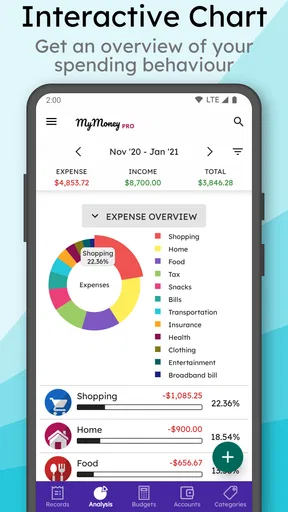
Numbers can be overwhelming, but MyMoney Pro makes them a breeze to understand with its data visualization tools. The charts and graphs are not just eye-candy; they provide a clear view of your financial habits. It's pretty enlightening to see where your money is going, and it definitely nudges you to make smarter choices.
I find those visuals most useful after the underlying entries have had a quick check. If a chart suggests that one category is unusually high, I would inspect the transactions before changing my habits: a duplicated expense or a purchase filed under the wrong heading can distort the picture. Looking at both the summary and the entries is a simple way to avoid drawing a confident conclusion from a messy record.
How it fits beside other money tools
Compared with a basic notes app or a spreadsheet, MyMoney Pro gives spending a more structured home: categories, recurring transactions, budgets, and visual summaries are all part of the same money-management approach. A spreadsheet may suit someone who wants to design every formula and layout, while a notes app can be faster for a person who only needs an informal running total. I see this app as the middle ground for people who want structure without building their own system.
It is also different from relying only on a bank’s transaction history. A bank record can be convenient for checking what cleared an account, but a personal budget asks a separate question: what limit do I want for dining, transport, or another category? MyMoney Pro’s value is in the tracking and planning routine, not in replacing a bank or making financial decisions on the user’s behalf. If automatic account connections are essential to your workflow, I would compare options carefully before choosing this manual-style approach.
Security and Syncing
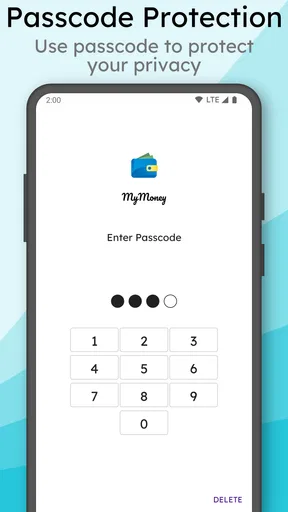
Let's talk about security because, honestly, nothing is more important than keeping your financial data safe. MyMoney Pro uses encryption to keep your data secure, which gives peace of mind. Plus, the app allows syncing across multiple devices. So, whether you’re on your phone or tablet, your data is updated and ready wherever you are.
For a shared routine across devices, I would check that I am using the same intended setup on each one and allow time for changes to appear before entering the same purchase twice. When a total looks wrong, I’d first compare the recent entries on the devices rather than immediately adding a correction. Duplicate entries can be harder to spot once they are buried in a monthly summary. Syncing is convenient, but a quick check of the transaction list remains sensible when reconciling an important figure.
When a number looks wrong
If a category total or balance seems off, I would work backward in a calm order: inspect recent transactions, look for a missing or duplicated entry, confirm the category and currency, and then review any recurring item that could affect the period. If the mismatch appears after using more than one device, I’d compare the lists before editing either copy. These checks are useful for ordinary bookkeeping mistakes and do not require assuming that the app itself has failed.
There are also times when the cause sits outside the app. A pending card payment, a refund that has not completed, or a bill that changed can make a personal record differ from a bank balance. I would compare like with like—posted transactions with posted transactions, and the same date range—before treating a difference as an error. That habit prevents unnecessary edits and keeps the budget useful as a planning record rather than an attempt to mirror every moment of bank processing.
Room for Improvement
No app is perfect, and MyMoney Pro has a few areas where it could improve. While the app is feature-rich, it might be a tad overwhelming for someone who's diving into budgeting apps for the first time. A more detailed onboarding process could help newbies get the hang of it faster.
Also, although the app offers a lot of features, a few more integrations with other financial tools could elevate its usability. Imagine having all your financial tools seamlessly integrated into one app – that would be the dream.
That is why I would not recommend it to everyone. Someone who dislikes recording purchases, wants a completely automated overview, or needs a highly customized spreadsheet may be happier with a different kind of tool. Likewise, people who share household spending should agree on categories and entry habits first; otherwise, different interpretations can make the totals less useful. For someone willing to maintain a simple routine, though, the structure can be a fair trade for the effort.
Version and who should consider it
The current release is version 6.1-pro, and the app has been available since November 10, 2019. I would treat version details as a practical compatibility check: before buying, confirm that the device meets the stated minimum of Android 6.0 and that the paid Pro edition matches what I want from a finance tracker. The $4.99 purchase makes it worth thinking through my routine first rather than paying on impulse; a tool only earns its place if I will actually keep its records current.
I think it is a better fit for someone who wants category-level awareness, plans monthly limits, or has regular expenses worth recording once and reviewing over time. A traveler may appreciate the currency support, while a person with a straightforward household budget may value the recurring entries and charts more. Someone who only needs to check account balances, on the other hand, may not need a separate budgeting app at all.
Final Thoughts
In the world of budgeting apps, MyMoney Pro – Expense & Budget stands out with its robust features and user-friendly design. Whether you’re a seasoned budgeter or just starting, this app has something to offer. It’s like having a financial expert whispering in your ear, guiding you to financial wellness.
If you’re serious about taking control of your finances, give MyMoney Pro a shot. It might just be the financial sidekick you’ve been looking for to transform your spending habits and boost your savings.
My practical recommendation is to start with a small experiment rather than trying to map every part of your finances on day one. Track a few important categories, check whether the totals answer a real question, and then expand only if the routine feels sustainable. The app is most convincing when I use its records to make a specific choice—such as setting a more realistic dining budget—not when I expect a chart alone to change my behavior.
Verdict
Strengths of MyMoney Pro - Expense & Budget
- Intuitive user interface for easy navigation.
- Customizable budget categories to suit needs.
- Supports multiple currencies for global users.
- Real-time expense tracking with detailed reports.
- Secure data with cloud backup and encryption.
Limitations of MyMoney Pro - Expense & Budget
- Limited free version features.
- Occasional sync issues with bank accounts.
- No direct bill payment options.
- Premium version is relatively expensive.
- Complex setup for new users.
Similar Picks in This Category
View All
Google Wallet
Google LLC4.3

Airtel: Recharge, Bank & Loans
Airtel4.0

PayPal - Pay, Send, Save
PayPal Mobile4.2

DANA Indonesia Digital Wallet
PT Espay Debit Indonesia Koe4.5

Binance: Buy Bitcoin & Crypto
Binance Inc.4.8

Cash App
Block, Inc.4.7
Frequently Asked Questions
What features does MyMoney Pro offer for managing expenses?
MyMoney Pro provides an extensive suite of features such as expense tracking, budget planning, and financial reporting. The app allows users to categorize expenses, set spending limits, and receive alerts when nearing those limits. Additionally, it offers integration with bank accounts for real-time updates and customizable reports to analyze financial habits.
Is MyMoney Pro secure for linking bank accounts?
Yes, MyMoney Pro prioritizes security by employing encryption protocols and multi-factor authentication to protect user data. The app only accesses necessary information with user consent and does not store sensitive bank credentials on its servers. Regular updates ensure compliance with the latest security standards, providing a safe environment for financial tracking.
Can I use MyMoney Pro offline, and how does it sync data?
MyMoney Pro offers offline functionality, allowing users to input and track expenses without an internet connection. Once connected to the internet, the app automatically syncs data across all devices linked to the user's account. This ensures that information is always up-to-date and accessible, regardless of network availability.
How user-friendly is the interface of MyMoney Pro?
MyMoney Pro boasts an intuitive and easy-to-navigate interface designed for users of all experience levels. The app features clear icons, straightforward menus, and customizable dashboards that make managing finances simple and efficient. Tutorials and support are available for new users, ensuring a smooth transition to the app’s functionalities.
What kind of customer support does MyMoney Pro offer?
MyMoney Pro provides comprehensive customer support through various channels, including email, live chat, and an extensive FAQ section on their website. Users can access step-by-step guides and video tutorials to resolve common issues. Additionally, the app includes an in-app support feature, allowing users to submit queries directly from the application.
